01The verdict
8.0 / 10 · Best for fast capture
A sharp to-do app that hits a wall at five projects
Todoist is the to-do list we’d hand to someone who needs tasks out of their head fast. Quick Add is the star: type a sentence with a date, priority and project, and it lands in the right place. The apps sync across phone, desktop, web and Watch without fuss.
The free Beginner plan works until you need a sixth project. After that, Pro at $5 a month billed yearly is cheap for what you get. Calendar layout, custom reminders and full history sit behind that paywall. We’d start free, then pay when the fifth project fills up.
02Screenshots
From the App Store
A look inside the app

03Design & everyday use
Design & everyday use · 8.5
Clean lists, boards and a home that stays out of the way
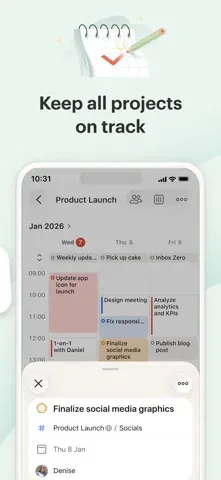
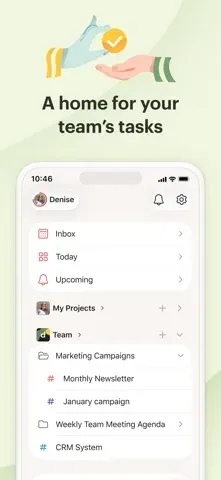
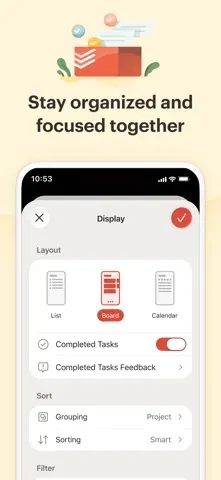
Todoist’s interface is list-first and easy to scan. Today, Upcoming and project views cover most days. Board layout is available on the free plan, so a Kanban-style board does not require Pro. Themes are limited on Beginner and open up on paid plans.
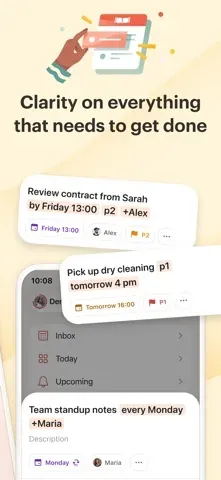
Task detail holds descriptions, sub-tasks, comments, reminders and activity in one place. Nothing feels fancy. The app stays fast on iPhone and Mac, which matters when you open it dozens of times a day.
04Quick Add & capture
Quick Add & capture · 9.0
Type a sentence, get a clear task
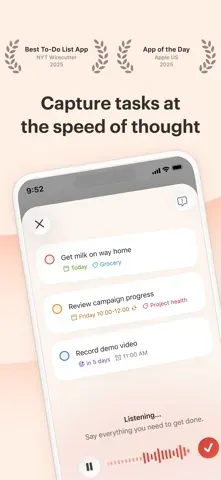
Quick Add is why people stick with Todoist. Type “Submit invoice p1 tomorrow #Finance” and you get a high-priority task due tomorrow in the Finance project. Natural language dates, recurring rules, labels and assignees all parse in the same field.
Capture works from the iOS share sheet, widgets, Watch, browser extensions and email. Pro adds Ramble and Task Assist for voice and AI-helped capture, with unlimited sessions on fair use. Beginner shares a small monthly pool of those sessions across both tools.
05Organization
Organization · 8.0
Projects and filters scale; the free caps do not
Projects, sections, labels and priorities give you enough structure for personal and light team work. Filters turn queries into saved views, which is where power users live. On Pro you get up to 150 filters and a calendar layout with task durations and time-blocking.
Beginner stops at 5 personal projects, 3 filters and 1 week of activity history. Hit those limits and extra projects go view-only until you upgrade or archive. Active tasks still cap at 300 per project on every plan, which rarely bites once completed tasks fall off the count.
06Cross-platform
Cross-platform · 8.5
One list on every screen you already use
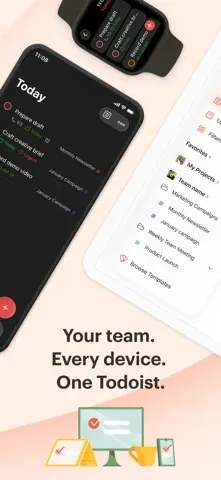
Todoist runs on iPhone, iPad, Mac, Android, Windows, the web and Apple Watch. Sync is reliable in daily use. Keyboard shortcuts on desktop and a solid web app make it fine as a main work surface, not just a phone companion.
Integrations cover Google Calendar, Outlook, Slack, email and dozens of others. For most people the first-party apps are enough; the API and community tools are there if you need them.
07Plans & pricing
Value · 8.0
Free until the fifth project; Pro is cheap after that
US prices as of October 2026. Confirm at checkout, since regional pricing and promotions change:
- Beginner5 projects, 3 filters, 1 week history$0
- ProBilled yearly ($60/yr); $7/mo month-to-month$5/mo
- BusinessBilled yearly; $10/user/mo month-to-month$8/user
Beginner is enough for a handful of personal lists. Pro raises the limit to 300 projects and adds calendar layout, custom reminders, task durations, full history, larger uploads and unlimited AI capture sessions. At $5 a month billed yearly ($60/yr), or $7 month-to-month, it is one of the cheaper Pro tiers in productivity. Business adds a shared team workspace from $8 per user per month billed yearly.
08Privacy
Privacy · 6.0
Cloud by design, with export and standard controls
Todoist stores your tasks on Doist’s servers. There is no local-first mode and no end-to-end encryption for task content. Doist publishes a privacy policy, offers data export, and states SOC 2 Type II certification on its pricing and trust materials.
That is fine for ordinary personal and work lists. It is a weaker fit if you need private material to stay on-device or under your own keys. Check account and integration permissions if you connect calendars, Slack or email.
09Alternatives
Worth a look
When another tool makes more sense

Notion
Wins when tasks sit inside docs, wikis and databases. Heavier to open for a quick capture, stronger when the work is writing and planning together.

Slack
The better hub if your team already lives in chat. Messages, huddles and reminders stay in one place; Todoist stays clearer for personal and project lists.

Discord
Fine for community servers and casual group lists. Weak as a clear task system once you need due dates, filters and recurring work.
10Bottom line
Start free, pay at six
Use free until the wall, then take Pro
Install Todoist and live on Beginner until a sixth project appears. If Quick Add fits how you think, Pro at $5 a month billed yearly is an easy yes for calendar layout, custom reminders and room to grow. If you want docs and databases beside tasks, look at Notion first. If your team already lives in Slack, keep tasks there or pair Slack with Todoist rather than replacing either.